Structure web pages with HTML
Wireframe and Design

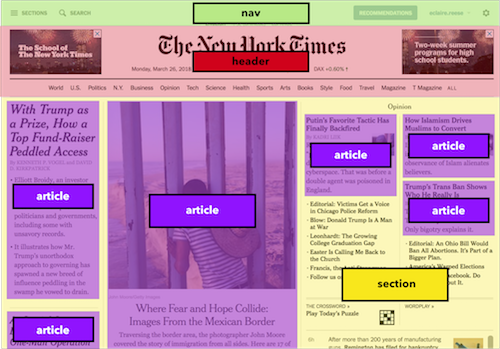
Wireframing is a practice used by UX designers which allows them to define and plan the information hierarchy of their design for a website, app, or product. This process focuses on how the designer or client wants the user to process information on a site, based on the user research already performed by the UX design team.
-
The best tools for wireframing
1- [UXPin] (https://www.uxpin.com/)
2-[InVision] (http://www.invisionapp.com/)
3-Wireframe.cc -
How to make your wireframe
1- Do your research
2- Prepare your research for reference
3- Make sure you have your user flow mapped out
4- Draft, don’t draw. Sketch, don’t illustrate
5- Add some detail and get testing
6- Start turning your wireframes into prototypes
[For More Details of Wireframe and Design ] (https://careerfoundry.com/en/blog/ux-design/how-to-create-your-first-wireframe/)
————————————–Mozilla HTML Basics
![MTB] (https://developer.mozilla.org/en-US/docs/Learn/Getting_started_with_the_web/HTML_basics/grumpy-cat-small.png)
HTML is a markup language that defines the structure of your content. HTML consists of a series of elements, which you use to enclose, or wrap, different parts of the content to make it appear a certain way, or act a certain way
-
The main parts of our element are as follows:
1- The opening tag
2- The closing tag
3- The content
4- The element -
There is two tybe of elements
1- Nesting elements
for example : put elements inside other elements like
*<p>My cat is very grumpy.</p> *
2- Empty elements : Some elements have no content like

For More Details of Mozilla HTML Basics & All Tags
Semantics
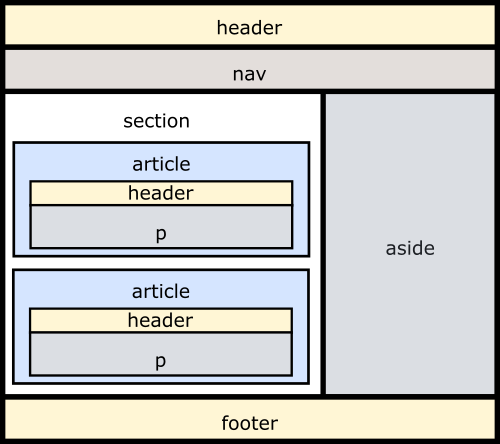
Semantics refers to the meaning of a piece of code — for example “what effect does running that line of JavaScript have?”, or “what purpose or role does that HTML element have” (rather than “what does it look like?”.)
-
Semantics in HTML
In HTML, for example, the <h1> element is a semantic element, which gives the text it wraps around the role (or meaning) of “a top level heading on your page.” - benefits from writing semantic markup are as follows:
- Search engines will consider its contents as important keywords to influence the page’s search rankings (see SEO)
- Screen readers can use it as a signpost to help visually impaired users navigate a page
- Finding blocks of meaningful code is significantly easier than searching through endless divs with or without semantic or namespaced classes
-
Suggests to the developer the type of data that will be populated
- Semantic elements These are some of the roughly 100 semantic elements available:
-
-
-
-
-
-
-
-
[For More Details of Semantics] (https://developer.mozilla.org/en-US/docs/Glossary/Semantics)