links
Links are the defining feature of the web because they allow you to move from one web page to another — enabling the very idea of browsing or surfing.

Links are created using the element. Users can click on anything between the opening tag and the closing tag. You specify which page you want to link to using the href attribute.
- Links are created using the element.
- The element uses the href attribute to indicate the page you are linking to.
- If you are linking to a page within your own site, it is best to use relative links rather than qualified URLs.
- You can create links to open email programs with an email address in the “to” field.
- You can use the id attribute to target elements within a page that can be linked to. ———————————-
Layout
Websites often display content in multiple columns (like a magazine or a newspaper).
HTML Layout Elements
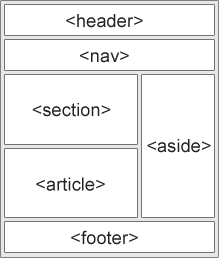
HTML has several semantic elements that define the different parts of a web page:
-
- Defines a header for a document or a section -
- Defines a section in a document -
- Defines an independent, self-contained content -
- Defines additional details that the user can open and close on demand
-
- Defines a heading for the -
element
HTML Layout Techniques
There are four different techniques to create multicolumn layouts. Each technique has its pros and cons:
- CSS framework If you want to create your layout fast, you can use a CSS framework, like W3.CSS or Bootstrap.
- CSS float property It is common to do entire web layouts using the CSS float property. Float is easy to learn - you just need to remember how the float and clear properties work. Disadvantages: Floating elements are tied to the document flow, which may harm the flexibility. Learn more about float in our CSS Float and Clear chapter.
- CSS flexbox Use of flexbox ensures that elements behave predictably when the page layout must accommodate different screen sizes and different display devices.
- CSS grid
The CSS Grid Layout Module offers a grid-based layout system, with rows and columns, making it easier to design web pages without having to use floats and positioning.
——————————————-
Functions
let you group a series of statements together to perform a specific task. If different parts of a script repeat the same task, you can reuse the function (rather than repeating the same set of statements).
JavaScript Function Syntax
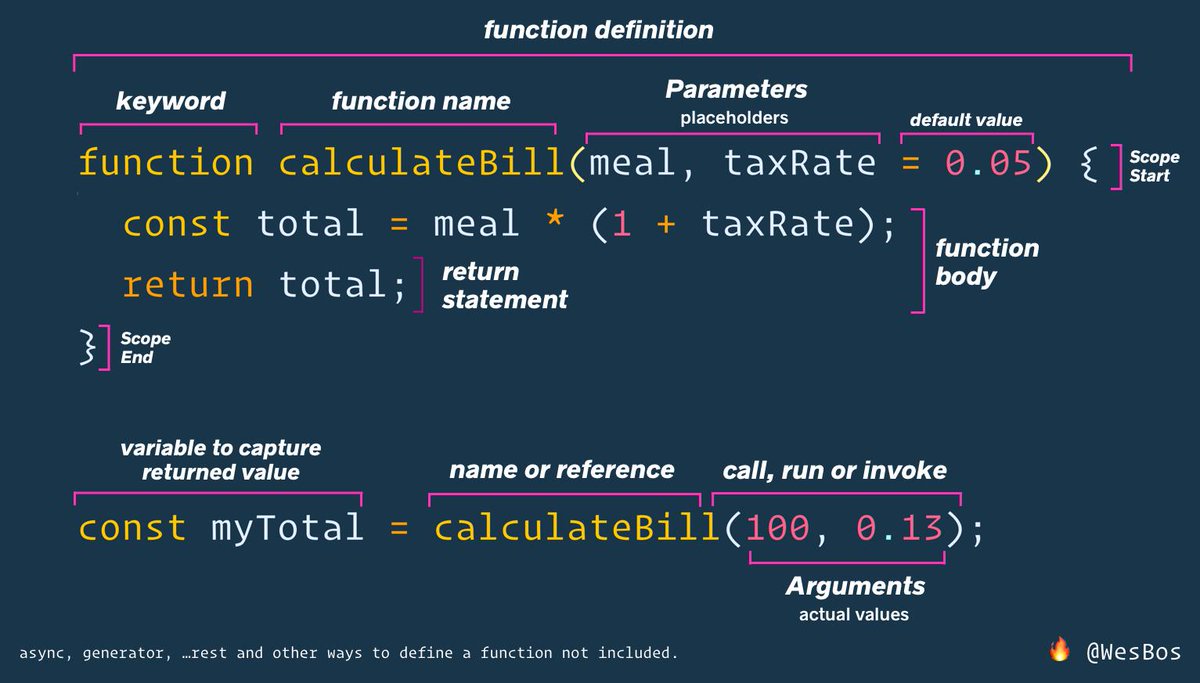
A JavaScript function is defined with the function keyword, followed by a name, followed by parentheses ().
Function names can contain letters, digits, underscores, and dollar signs (same rules as variables).
The parentheses may include parameter names separated by commas: (parameter1, parameter2, …)
The code to be executed, by the function, is placed inside curly brackets: {}
-
Function parameters are listed inside the parentheses () in the function definition.
-
Function arguments are the values received by the function when it is invoked.
-
Inside the function, the arguments (the parameters) behave as local variables.
-
Function Return When JavaScript reaches a return statement, the function will stop executing.
If the function was invoked from a statement, JavaScript will “return” to execute the code after the invoking statement.
Functions often compute a return value. The return value is “returned” back to the “caller”:
Why Functions?
You can reuse code: Define the code once, and use it many times.
You can use the same code many times with different arguments, to produce different results.