Local Storage
ersistent local storage is one of the areas where native client applications have held an advantage over web applications.

- INTRODUCING HTML5 STORAGE
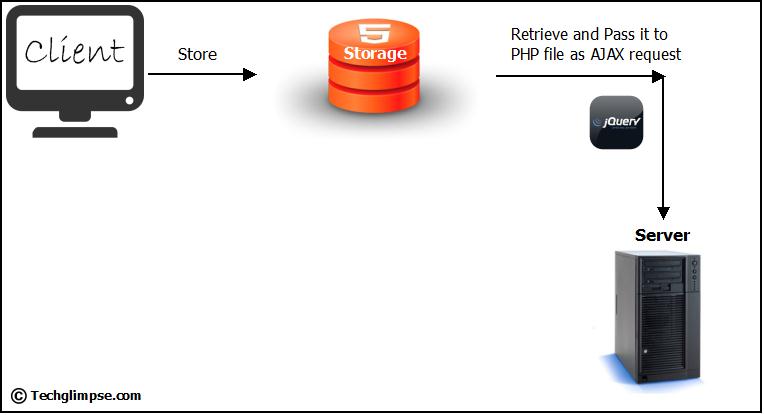
HTML5 Storage : Simply put, it’s a way for web pages to store named key/value pairs locally, within the client web browser. Like cookies, this data persists even after you navigate away from the web site, close your browser tab, exit your browser, or what have you.
- USING HTML5 STORAGE HTML5 Storage is based on named key/value pairs. You store data based on a named key, then you can retrieve that data with the same key. The named key is a string. The data can be any type supported by JavaScript, including strings, Booleans, integers, or floats.
interface Storage {
getter any getItem(in DOMString key);
setter creator void setItem(in DOMString key, in any data);
};
——————————————————
- TRACKING CHANGES TO THE HTML5 STORAGE AREA
If you want to keep track programmatically of when the storage area changes, you can trap the storage event. The storage event is fired on the window object whenever setItem(), removeItem(), or clear() is called and actually changes something.
- STORAGEEVENT OBJECT
-
LIMITATIONS IN CURRENT BROWSERS In talking about the history of local storage hacks using third-party plugins, I made a point of mentioning the limitations of each technique, such as storage limits. I just realized that I haven’t mentioned anything about the limitations of the now-standardized HTML5 Storage. I’ll give you the answers first, then explain them. The answers, in order of importance, are “5 megabytes,” “QUOTA_EXCEEDED_ERR,” and “no.”
-
HTML5 STORAGE IN ACTION
Let’s see HTML5 Storage in action. Recall the Halma game we constructed in the canvas chapter. There’s a small problem with the game: if you close the browser window mid-game, you’ll lose your progress. But with HTML5 Storage, we can save the progress locally, within the browser itself. Here is a live demonstration. Make a few moves, then close the browser tab, then re-open it. If your browser supports HTML5 Storage, the demonstration page should magically remember your exact position within the game, including the number of moves you’ve made, the position of each of the pieces on the board, and even whether a particular piece is selected. -
BEYOND NAMED KEY-VALUE PAIRS:
COMPETING VISIONS While the past is littered with hacks and workarounds, the present condition of HTML5 Storage is surprisingly rosy. A new API has been standardized and implemented across all major browsers, platforms, and devices. As a web developer, that’s just not something you see every day